Docker Compose

What is docker compose?
Docker Compose is a tool that assists in defining and sharing multi-container applications. By using Compose, we can define the services in a YAML file, as well as spin them up and tear them down with one single command. To understand Docker Compose, let’s look at Myntra as an example. Myntra is a fashion e-commerce website similar to Amazon. You visit the Myntra website through your web browser and go through several activities, like logging in to your account, browsing a catalog, checking out, and so on. Behind each of these activities or services are different products, such as an account database, product database, cart database, and others that run behind the scenes.
What is YAML ?
YAML is a data serialization language often used for writing configuration files. Its name stands for “Yet Another Markup Language.” This programming language is popular because it is easy to understand and human-readable. It can also be used in conjunction with other languages.
Understanding a YAML file:-
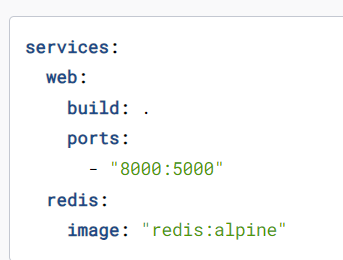
This Compose file defines two services: web and Redis.
The Web service uses an image that's built from the Dockefile in the current directory. It then binds the container and the host machine to the exposed port, 8000. This example service uses the default port for the Flask web server, 5000.
The Redis service uses a public Redis open in a new image pulled from the Docker Hub registry.
Start up your application by docker compose up.
Task-2: Working with Docker Compose
Now, let's pull a pre-existing Docker image from a public repository and run it on your local machine using Docker Compose. Follow these steps:
Pull and Run the Image : docker-compose up -d
Inspect Container Processes and Ports : docker inspect <container_name>
View Container Logs: docker logs <container_name>
Stop and Start the Container : docker stop <container_name> docker start <container_name>
Remove the Container : docker rm <container_name>
How to run Docker commands without sudo?
Make sure docker is installed and system is updated.
sudo usermod -a -G docker $USER
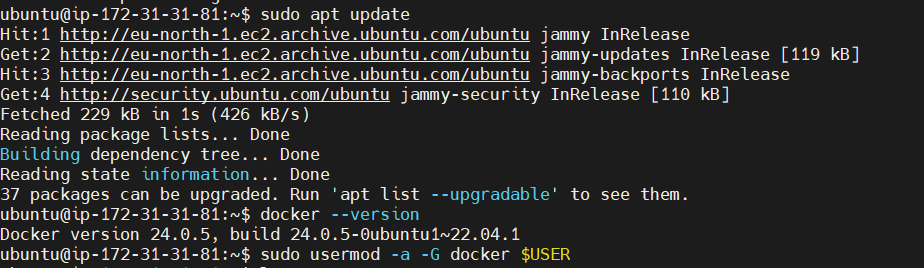
- Reboot the machine to apply changes.
With these tasks, you've taken a significant step toward mastering Docker Compose and further enhanced your Docker skills. Keep exploring and experimenting with different configurations to deepen your understanding of container orchestration.
HAPPY LEARNING.


